local Rayfield = loadstring(game:HttpGet('https://sirius.menu/rayfield'))()
local Window = Rayfield:CreateWindow({
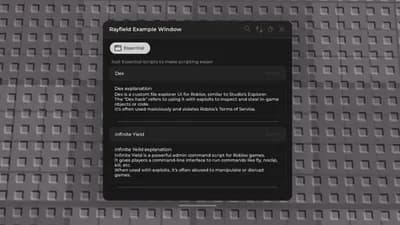
Name = "Rayfield Example Window",
Icon = 0, -- Icon in Topbar. Can use Lucide Icons (string) or Roblox Image (number). 0 to use no icon (default).
LoadingTitle = "Rayfield Interface Suite",
LoadingSubtitle = "by Sirius",
ShowText = "Rayfield", -- for mobile users to unhide rayfield, change if you'd like
Theme = "Default", -- Check https://docs.sirius.menu/rayfield/configuration/themes
ToggleUIKeybind = "K", -- The keybind to toggle the UI visibility (string like "K" or Enum.KeyCode)
DisableRayfieldPrompts = false,
DisableBuildWarnings = false, -- Prevents Rayfield from warning when the script has a version mismatch with the interface
ConfigurationSaving = {
Enabled = true,
FolderName = nil, -- Create a custom folder for your hub/game
FileName = "Big Hub"
},
Discord = {
Enabled = false, -- Prompt the user to join your Discord server if their executor supports it
Invite = "noinvitelink", -- The Discord invite code, do not include discord.gg/. E.g. discord.gg/ ABCD would be ABCD
RememberJoins = true -- Set this to false to make them join the discord every time they load it up
},
KeySystem = false, -- Set this to true to use our key system
KeySettings = {
Title = "Untitled",
Subtitle = "Key System",
Note = "No method of obtaining the key is provided", -- Use this to tell the user how to get a key
FileName = "Key", -- It is recommended to use something unique as other scripts using Rayfield may overwrite your key file
SaveKey = true, -- The user's key will be saved, but if you change the key, they will be unable to use your script
GrabKeyFromSite = false, -- If this is true, set Key below to the RAW site you would like Rayfield to get the key from
Key = {"Hello"} -- List of keys that will be accepted by the system, can be RAW file links (pastebin, github etc) or simple strings ("hello","key22")
}
})
local Tab = Window:CreateTab("Essential", "app-window")
Tab:CreateSection("Just Essential scripts to make scripting easier")
Tab:CreateButton({
Name = "Dex",
Callback = function()
loadstring(game:HttpGet("https://raw.githubusercontent.com/infyiff/backup/main/dex.lua"))()
end,
})
Tab:CreateParagraph({
Title = "Dex explanation",
Content = "Dex is a custom file explorer UI for Roblox, similar to Studio’s Explorer.\nThe \"Dex hack\" refers to using it with exploits to inspect and steal in-game objects or code.\nIt’s often used maliciously and violates Roblox’s Terms of Service."
})
Tab:CreateDivider()
Tab:CreateButton({
Name = "Infinite Yield",
Callback = function()
loadstring(game:HttpGet("https://raw.githubusercontent.com/EdgeIY/infiniteyield/master/source"))()
end,
})
Tab:CreateParagraph({
Title = "Infinite Yeild explanation",
Content = "Infinite Yield is a powerful admin command script for Roblox games.\nIt gives players a command-line interface to run commands like fly, noclip, kill, etc.\nWhen used with exploits, it's often abused to manipulate or disrupt games."
})
Tab:CreateDivider()
Tab:CreateButton({
Name = "Rayfield",
Callback = function()
local link = "https://docs.sirius.menu/rayfield" -- Replace with your link
setclipboard(link)
Rayfield:Notify({
Title = "Link Copied!",
Content = "Paste it in your browser to open.",
Duration = 5,
Image = "clipboard"
})
end,
})
Tab:CreateParagraph({
Title = "Rayfield explanation",
Content = [[
Rayfield is a powerful Roblox UI library that helps you build custom interfaces easily.
It supports themes, notifications, tabs, key systems, and more.
You can find full documentation at the link above.
]]
})
Tab:CreateDivider()

 Delta
Delta



Comments
No comments yet
Be the first to share your thoughts!