-- Services
local UserInputService = game:GetService("UserInputService");
-- UI
local Modal = loadstring(game:HttpGet("https://github.com/BloxCrypto/Modal/releases/download/v1.0-beta/main.lua"))()
local Window = Modal:CreateWindow({
Title = "Modal",
SubTitle = "Hi",
Size = UDim2.fromOffset(400, 400),
MinimumSize = Vector2.new(250, 200),
Transparency = 0,
Icon = "rbxassetid://68073547",
})
local ScriptSettings = ({
NotificationKey = Enum.KeyCode.LeftControl
})
-- Components
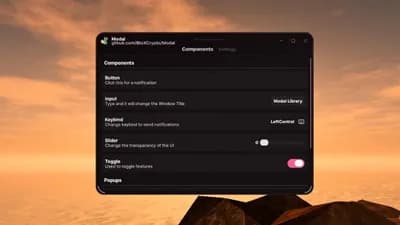
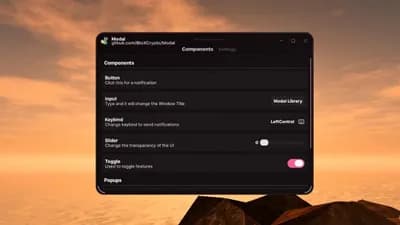
local Components = Window:AddTab("Components")
Components:New("Title")({
Title = "Components",
})
Components:New("Button")({
Title = "Button",
Description = "Click this for a notification",
Callback = function()
Window:Notify({
Title = "Notification",
Description = "This is a notification",
Duration = 5,
Type = "Info",
})
end,
})
Components:New("Input")({
Title = "Input",
Description = "Type and it will change the Window Title",
DefaultText = "Modal Library",
Placeholder = "Title Name",
Callback = function(Value)
Window:SetTitle(Value);
-- Window:SetSubTitle("Anything") -- for setting subtitle
-- Window:SetIcon("rbxassetid://0") -- for setting icon
end,
})
Components:New("Keybind")({
Title = "Keybind",
Description = "Change keybind to send notifications",
DefaultKeybind = "LeftControl",
Callback = function(Key)
ScriptSettings.NotificationKey = Key -- Check bottom of the script to see how to use this
print("Got key:", Key) -- Key returns UserInputType if it's a mouse and KeyCode if it's anything else
end,
})
Components:New("Slider")({
Title = "Slider",
Description = "Change the transparency of the UI",
Default = 0,
Minimum = 0,
Maximum = 0.8,
DecimalCount = 2, -- 0.22 for example (2 decimals)
Callback = function(Amount)
Window:SetTransparency(Amount);
end,
})
local Toggle
Toggle = Components:New("Toggle")({
Title = "Toggle",
Description = "Used to toggle features",
DefaultValue = true,
Callback = function(Value)
print("Got:", Value);
Toggle:SetTitle("Value Changed"); -- Changes the title of the component
Toggle:SetDescription("New value is " .. tostring(Value)); -- Changes description
end,
})
Components:New("Title")({
Title = "Popups",
})
Components:New("Dropdown")({
Title = "Regular Dropdown",
Description = "Only can select 1 option",
Options = { "Option 1", "Option 2" },
Default = "Option 1",
Callback = function(Value)
print("Dropdown got:", Value);
end,
})
Components:New("MultiDropdown")({
Title = "Regular Dropdown",
Description = "Multiple selectable options",
Options = { "Option 1", "Option 2", "Option 3" },
Default = { "Option 2", "Option 3" },
Callback = function(Values)
print("MultiDropdown got:", Values);
print("Concat:", table.concat(Values, ", "))
end,
})
Components:New("ColorPicker")({
Title = "Color Picker",
Description = "Returns a Color3 value",
Default = Color3.fromRGB(255, 114, 43),
Callback = function(Color)
print("ColorPicker got:", Color);
end,
})
-- Settings
local Settings = Window:AddTab("Settings")
Settings:New("Title")({
Title = "Themes"
})
Settings:New("Dropdown")({
Title = "Theme",
Description = "Default theme options",
Options = { "Light", "Dark", "Midnight", "Rose", "Emerald" },
Callback = function(Theme)
Window:SetTheme(Theme)
end,
})
Settings:New("Button")({
Title = "Set Custom GUI",
Description = "This is to showcase how custom themes work (without the default ones)",
Callback = function()
-- Any section that has rotation as an option (like background) supports gradients (colorsequences)
-- Any that don't have the rotation option - only support Color3 values
local CustomTheme = {
Mode = "Dark",
Accent = Color3.fromRGB(255, 170, 70),
Background = {
Rotation = 120,
Color = ColorSequence.new({
ColorSequenceKeypoint.new(0, Color3.fromRGB(22, 18, 14)),
ColorSequenceKeypoint.new(1, Color3.fromRGB(10, 8, 6))
}),
Line = {
Color = Color3.fromRGB(255, 200, 120),
Transparency = 0.9
},
OuterOutline = {
Transparency = 0,
Color = Color3.fromRGB(5, 4, 3),
Rotation = 0,
},
InnerOutline = {
Transparency = 0.78,
Color = Color3.fromRGB(170, 130, 90),
Rotation = 0,
}
},
Text = {
Title = {
Color = Color3.fromRGB(255, 245, 230),
},
Description = {
Color = Color3.fromRGB(205, 190, 170),
}
},
Icons = {
ActionButtons = {
Color = Color3.fromRGB(255, 215, 160),
Transparency = 0.18,
}
},
Content = {
Color = ColorSequence.new({
ColorSequenceKeypoint.new(0, Color3.fromRGB(24, 20, 16)),
ColorSequenceKeypoint.new(1, Color3.fromRGB(16, 13, 10))
}),
Rotation = 240,
ScrollBarColor = Color3.fromRGB(200, 160, 110),
InnerOutline = {
Transparency = 0.92,
Color = Color3.fromRGB(160, 125, 85),
Rotation = 0,
},
OuterOutline = {
Transparency = 0,
Color = Color3.fromRGB(6, 5, 4),
Rotation = 0,
},
},
Component = {
Color = Color3.fromRGB(26, 22, 18),
Rotation = 0,
},
Controls = {
Color = Color3.fromRGB(36, 30, 24),
Outline = Color3.fromRGB(48, 40, 32)
},
}
Window:SetTheme(CustomTheme);
end,
})
Settings:New("Button")({
Title = "Destroy GUI",
Description = "Click to get rid of the UI (can't be brought back)",
Callback = function()
Window:Destroy();
end,
})
Window:SetTab("Components")
Window:SetTheme("Rose")
UserInputService.InputBegan:Connect(function(Input)
if (Modal:IsCorrectInput(Input, ScriptSettings.NotificationKey)) then
Window:Notify({
Title = "Modal",
Description = "Keybind triggered",
Duration = 5,
Type = "Success"
})
end
end)




Comments
No comments yet
Be the first to share your thoughts!